Using playkeys
Superior. Link to video here Using playkeys will lock matches to what round, teams to play, match order, referee and organizer. Referee and organizer are not demanded. Playkeys are defined in its own…
Superior
Using playkeys will lock matches to what round, teams to play, match order, referee and organizer. Referee and organizer are not demanded. Playkeys are defined in its own tables and sorted for each federation.
How to edit playkeys
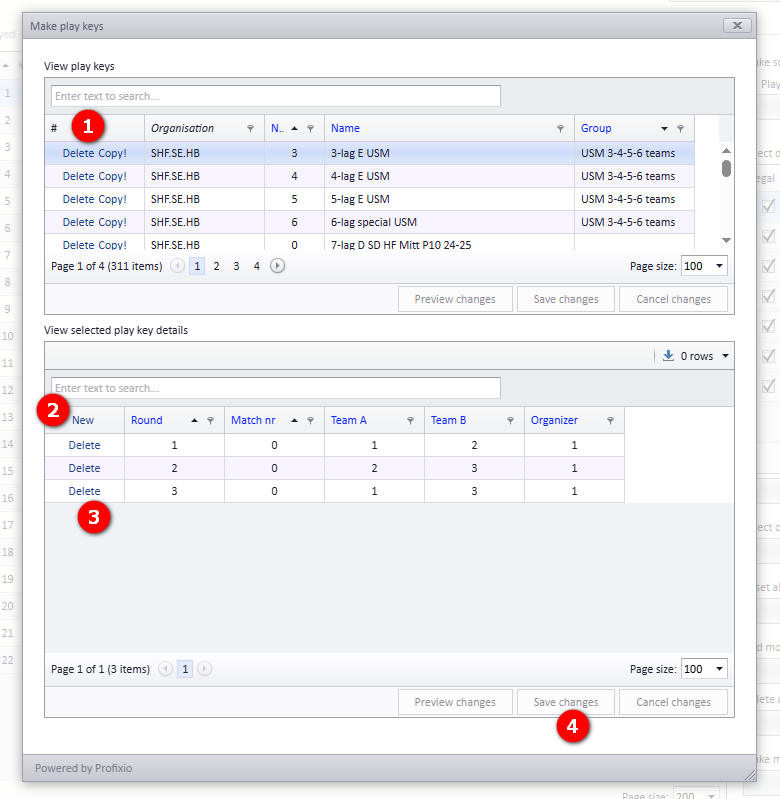
In "Basic data" - "Prepare schedule" there is a button "Open play key window". Be careful to delete playkeys or playkeys details!
- Make a copy of an existing playkey if you want to make a new one.
- Enter "New" to make new playkey match rows
- Delete rows which you do not want to have.
- And always; Remember to save
Venue assigned to match
Using playkeys where organizer is set, the match home team will be set to the organizer club home team. Otherwise, it is alwasy venue for the home team which is set to a match.
How did we do?
Anti teams
Schedule - using visualizer